Create an extension
This tutorial builds a small backend extension named Hello Cove. When you finish, Cove will load it from a ZIP package and show it in the installed extensions list. The example deliberately has no frontend bundle; seeing the enabled extension proves that the manifest, compiled assembly, package layout, and install flow all work before you add a UI or another capability.
Prerequisites
Section titled “Prerequisites”You need:
- the .NET 10 SDK
- Git and Python 3
- a running Cove 1.0.0 or later instance where you can manage extensions
- an HTTP URL that the Cove server can reach; the server, not your browser, downloads the ZIP
Run these checks in a terminal:
dotnet --versiongit --versionpython3 --versionThe dotnet result should start with 10..
Start from the official template
Section titled “Start from the official template”For a real project, open the single-extension repository template, select Use this template, and clone the repository it creates. To work through the tutorial without first creating a GitHub repository, clone the template directly:
git clone https://github.com/yourcove/single-extension-repo-template.git hello-covecd hello-coveThe template starts with this layout:
.├── .github/workflows/build.yml├── Directory.Build.props├── SingleExtensionTemplate.slnx└── src/ExampleExtension ├── ExampleExtension.cs ├── ExampleExtension.csproj └── extension.jsonThe release workflow publishes the project, places extension.json at the package root, and creates a release ZIP from a v* Git tag. This tutorial uses the same project layout but creates a local development ZIP.
Choose the extension base class
Section titled “Choose the extension base class”The template’s minimal example implements the low-level IExtension contract from Cove.Plugins. That remains supported, but it repeats the extension id, name, and version in C# and in extension.json.
Use Cove.Sdk for new host-aware extensions:
- Extend
CoveExtensionBasefor the common lifecycle, dependency injection, and optional UI contributions. It reads identity and other metadata fromextension.json, so the manifest is the single source of truth. - Extend
FullExtensionBaseonly when one extension needs several of its API, data, event, job, state, and scan capabilities. Its extra interfaces are unnecessary for this first extension. - Implement a narrow contract directly only when you intentionally do not need the SDK helpers.
Switch the template to Cove.Sdk
Section titled “Switch the template to Cove.Sdk”Replace src/ExampleExtension/ExampleExtension.csproj with this project. Cove.Sdk 1.0.0 supplies the host contracts and automatically keeps host-provided assemblies out of the published extension.
<Project Sdk="Microsoft.NET.Sdk">  <ItemGroup>    <FrameworkReference Include="Microsoft.AspNetCore.App" />  </ItemGroup>
  <ItemGroup>    <None Include="extension.json" CopyToOutputDirectory="PreserveNewest" CopyToPublishDirectory="Always" />  </ItemGroup>
  <ItemGroup>    <PackageReference Include="Cove.Sdk" Version="1.0.0" />  </ItemGroup></Project>
Keep the template’s Directory.Build.props; it selects .NET 10, enables nullable reference types, and configures dynamic loading.
Add the minimal backend
Section titled “Add the minimal backend”Replace src/ExampleExtension/ExampleExtension.cs with:
using Cove.Sdk;
namespace ExampleExtension;
public sealed class HelloCoveExtension : CoveExtensionBase{}
The class is intentionally empty. CoveExtensionBase supplies safe lifecycle defaults, while Cove applies the manifest before it reads the extension metadata. Add services later by overriding ConfigureServices, or follow the extension points guide when you are ready to add a capability.
Create the manifest
Section titled “Create the manifest”Replace src/ExampleExtension/extension.json with the complete manifest below. Change the example author and URL before publishing your own extension.
{ "id": "com.example.hello-cove", "name": "Hello Cove", "version": "0.1.0", "description": "A minimal extension that verifies the Cove extension toolchain.", "author": "Your name", "url": "https://github.com/your-name/hello-cove", "kind": "extension", "categories": ["tools"], "minCoveVersion": "1.0.0", "entryDll": "ExampleExtension.dll", "dependencies": {}, "externalDependencies": [], "settings": [], "tutorialTopics": [], "sharedAssemblies": [], "permissions": { "network": [], "scraperRuntime": [], "downloaderRuntime": [] }}The id must remain stable across releases. The entryDll value is case-sensitive on Linux and must match the project assembly name. Empty permission lists make it explicit that this example does not request network, scraper-runtime, or downloader-runtime access.
Build and package the extension
Section titled “Build and package the extension”From the repository root, restore and publish the project:
dotnet restore src/ExampleExtension/ExampleExtension.csprojdotnet publish src/ExampleExtension/ExampleExtension.csproj \ --configuration Release \ --output artifacts/extensionThe publish directory should contain both ExampleExtension.dll and extension.json. Create a development archive from inside that directory so extension.json is at the ZIP root:
( cd artifacts/extension python3 -m zipfile \ --create ../com.example.hello-cove-dev.zip \ .)python3 -m zipfile \ --list artifacts/com.example.hello-cove-dev.zipThe listing must show extension.json and ExampleExtension.dll without an enclosing artifacts/extension directory. Cove accepts the manifest at the archive root or inside one top-level extension directory; a root manifest keeps the package contents directly visible to archive-listing tools.
Serve the development ZIP
Section titled “Serve the development ZIP”In a second terminal, from the repository root, start a temporary HTTP server:
python3 -m http.server 4174 \ --bind 0.0.0.0 \ --directory artifactsIf Cove runs on the same machine outside a container, the package URL is:
http://127.0.0.1:4174/com.example.hello-cove-dev.zipFor a containerized or remote Cove server, replace 127.0.0.1 with a host name or address that is reachable from that server. Confirm reachability from the Cove host environment; opening the URL only in your desktop browser does not test the path Cove uses.
Install the ZIP directly
Section titled “Install the ZIP directly”For the quickest local development loop, upload the built archive without starting an HTTP server:
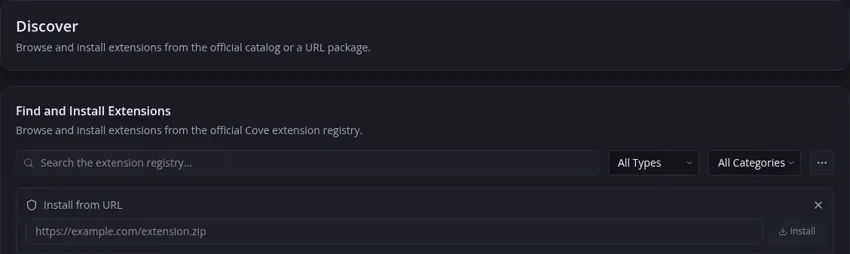
- In Cove, open Settings → Extensions → Discover.
- Select More extension actions (the three-dot button).
- Select Install from ZIP… and choose the built
.zipfile. - Select Install.
- Read the Install Unverified Extension warning. If you trust this package you just built, select Install to confirm.
- Open Settings → Extensions → Installed Extensions.
Use Install from URL… instead when the package is already hosted somewhere the Cove server can reach. URL installation follows the same archive validation, replacement, and initialization pipeline.
Install from the URL
Section titled “Install from the URL”- In Cove, open Settings → Extensions → Discover.
- Select More extension actions (the three-dot button).
- Select Install from URL….
- Enter the package URL and select Install.
- Read the Install Unverified Extension warning. If you trust this package you just built, select Install to confirm.
- Open Settings → Extensions → Installed Extensions.
The list should contain Hello Cove, version 0.1.0, with Unverified and an Enabled control. Direct ZIP and URL development packages are unverified because they do not come from Cove’s registry. That is the expected observable result for this backend-only example.
Make a change and reload
Section titled “Make a change and reload”To reload the extension during development, rebuild the package and upload the new ZIP again (or install the same URL again):
- Change the C# code or manifest. Increase
versionwhen the package represents a new release. - Run the publish and archive commands again.
- Upload the rebuilt ZIP again, or install the same development URL again. Cove replaces the installed package and reloads that extension.
- Refresh Installed Extensions and verify the displayed metadata and enabled state.
When using URL installation, keep the archive URL stable for this local loop. For a release, update .github/workflows/build.yml with your extension id and project path, then push a tag whose name matches the manifest version, such as v0.1.0.
Troubleshooting
Section titled “Troubleshooting”Cove says the manifest is missing
Section titled “Cove says the manifest is missing”Run the archive listing command again. extension.json must be at the root or in one top-level directory, not below a path such as artifacts/extension/extension.json inside the ZIP.
The package URL works in a browser but Cove cannot install it
Section titled “The package URL works in a browser but Cove cannot install it”The Cove server downloads the package. Use a URL reachable from the server or its container, check the temporary HTTP server output for Cove’s request, and avoid 127.0.0.1 when it would point back to a different container or machine.
Installation succeeds but the extension is absent
Section titled “Installation succeeds but the extension is absent”Check that entryDll exactly matches ExampleExtension.dll and that the archive contains that file. Then open Settings → System Info → Logs and look for an extension load error naming the manifest id or DLL.
The extension fails after adding a dependency
Section titled “The extension fails after adding a dependency”Run dotnet publish again instead of copying only your extension DLL. Private dependencies belong in the archive; host-provided assemblies such as Cove.Sdk, Cove.Plugins, and Cove.Core do not. The SDK packaging targets remove the host-provided assemblies automatically.
Cove rejects the compatibility requirement
Section titled “Cove rejects the compatibility requirement”Install from ZIP and Install from URL reject the package when the running Cove version is lower than minCoveVersion; registry installation also filters or rejects incompatible versions. Upgrade Cove or lower the requirement only if you have built and tested against that older host contract. A package copied directly into the extension directory can report the mismatch during startup validation yet still initialize in the current host, so manual placement is not a compatibility bypass or a supported verification result.
Once this minimal package works, add a frontend contribution only when the feature needs one. See UI extension points for bundle and component registration.