Providers, scrapers, and downloaders
Choose the right tool to bring in media, identify existing items, and apply trustworthy metadata at the right scale.
The three main roles
Cove separates bringing in new media from identifying existing media and from applying metadata to media you already have. Choose the role that matches the job before you configure a source.
Downloaders
Use a downloader for acquisition and intake from a supported source. A downloader can match a source URL, fetch new media, and place the finished item into the normal library workflow without leaving Cove.
Scrapers
Use a scraper to search for or extract metadata for an existing item when you want item-level review. Start with one item, inspect the suggested fields, and apply only the values you want before trusting that source broadly.
Metadata servers
Use a metadata server as a configured structured catalog after you trust its matches and want repeatable identification or enrichment. It is the better fit for identifying many items, enriching a larger part of the library, and centralizing a recurring provider workflow in Settings.
A recommended workflow
- Start with a scan or downloader intake.
- Test a scraper or metadata source on a small representative set.
- Review provenance and the quality of the result.
- Scale up only after the result looks trustworthy.
- Save the resulting cleanup or review workflow as a filter or dynamic group.
Configure a metadata server
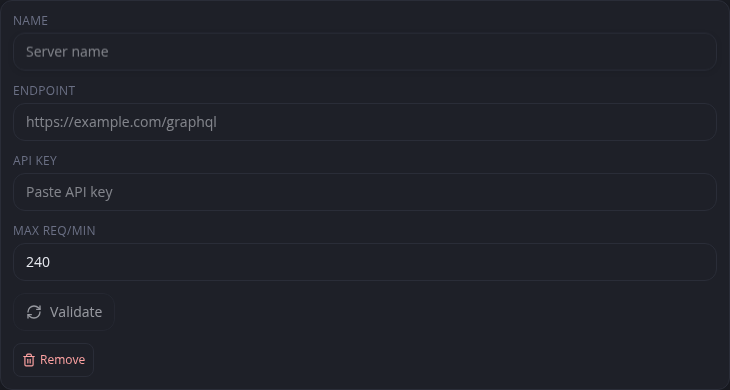
Open Settings → Data Sources & Data → Metadata Servers. Add a name, the server endpoint, and the API key from your account on that server. Set a request limit that respects the service, validate the connection, then use the server from Identify or Tagger.
Some metadata servers call a video record a scene. Cove still matches and stores that record as a video; scene in a provider's catalog does not mean a separate Cove media type.
Common metadata servers
| Server | Endpoint | What it covers |
|---|---|---|
| StashDB | https://stashdb.org/graphql | Community-driven database of digital scenes across all orientations. |
| ThePornDB | https://theporndb.net/graphql | Scenes and movies, powered by automated scrapers. |
| FansDB | https://fansdb.cc/graphql | Creator-platform content from several common platforms. |
| JAVStash | https://javstash.org/graphql | Japanese adult video with original Japanese metadata. |
| PMV Stash | https://pmvstash.org/graphql | Remixed works such as adult music videos. |
Each server needs its own account and API key. You can configure more than one; Cove records which server supplied each saved value.
Install and use downloaders
Downloaders are extensions, and each one knows how to fetch from a particular kind of source. Find the capability you need in Discover, install it like any other extension, then start a download and select it. Downloads continue in the background and appear in the library when they finish.
You can also create an item from a URL. In the New dialog, switch to URL and paste the link. Cove hands it to a matching installed downloader, which resolves the URL and fetches the media.
Review repeatedly with Tagger
Tagger is a fast review loop for making the same kind of metadata decision across many items. Filter first so the queue contains only the records you intend to review, compare each suggested match, and apply the changes you want before moving to the next item.