When to use dynamic groups
Decide when changing query results should become a library collection, and choose between a saved filter, static group, dynamic group, or built-in group.
Decide whether you need a group
Groups give a collection its own library identity, metadata, and relationships. Choose the lightest option that preserves the behavior you need:
- use a saved filter when you only need to revisit a search or filter view
- use a static group when you want to choose and order members directly
- use a dynamic group when the collection needs its own identity but membership should continue to follow a query
A static group can contain videos, images, audio, text, segments, and other groups, so it also works for deliberately curated or nested collections.
Create a dynamic group
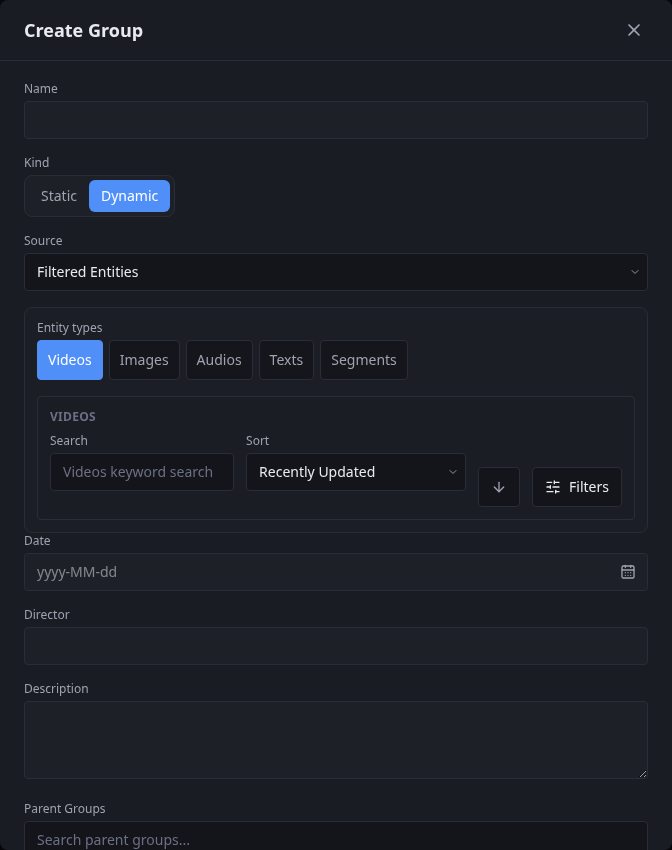
- Open Groups, select + New, and give the collection a name.
- Choose Dynamic, then select the source and the entity types the group may contain.
- Set the search, sort order, and filters that define the changing result.
- Add any useful group metadata or parent groups, then save.
Treat membership as current state
A dynamic result is not a historical snapshot. New matches can enter, old matches can leave, and changes to the resolver or stored query can alter the result. Cove resolves membership again as the library changes.
Built-in groups
Cove includes Watch History, Continue Watching, and Save for Later. These dynamic groups follow your activity automatically, are managed by Cove, and cannot be deleted.
Groups can also become playable compilations. This is especially useful when the membership is made from precise video segments, although compilations can contain other supported content types too.